MAX FOR LIVE | VOID ECOSYSTEM > RANDOM


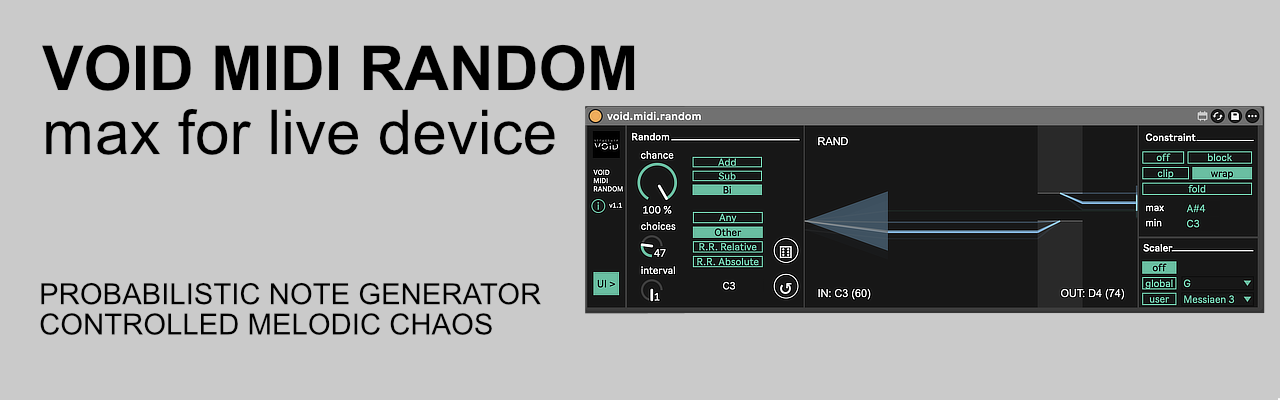
Zero-latency stochastic melodic engine. Powered by a high-performance external designed for surgical generative evolution and precise probabilistic variations within Ableton Live.
1. The Core: Zero-Latency C++ External
Driven by a custom-coded C++ external, this device ensures instantaneous MIDI processing and surgical timing accuracy. Unlike standard randomizers, it operates with absolute deterministic precision and zero overhead, making it reliable for complex live performances and high-density generative sequences.
2. The Logic: Deterministic Selection & Memory
Move beyond chaotic noise with four distinct selection behaviors, where the variation pool is strictly managed by internal buffers:
- Any (Pure Random): Total unpredictability for every triggered note.
- Other (No-Repetition): Ensures no two consecutive notes are identical.
- Urn (Non-Repeating): Ensures no interval is repeated until the entire set of Choices has been exhausted.
- Round-Robin (RR): Sequentially cycles through a generated sequence buffer.
- Deterministic Control: Use the Dice (Reset) to reallocate buffers or the Loop (Restart) to resync the sequence pointer.
- Relative vs. Absolute: Logic can be calculated based on the incoming note’s pitch (Relative) or from a fixed, static reference note (Absolute).
3. The Boundaries: Physical Constraint Math
Precisely manage notes that exceed your defined Min/Max range using four distinct mathematical behaviors:
- Block: Discards any note falling outside the boundaries (Red Laser / Surgical removal).
- Clip: Hard-limits notes to the range boundaries (Saturate).
- Wrap: Circularly wraps notes back into the range (Toroidal displacement).
- Fold: Reflects notes back into the range upon reaching boundaries (Mirroring).
4. The Harmony: Dual-Mode Scaler
Every note is forced into a specific musical mode for 100% cohesion. Choose between Global (Syncs with Live’s Scale LOM) or User modes. If a note is off-scale, the Magnetic Snap logic performs a bidirectional search for the nearest valid semitone (Yellow Laser).
5. Laser HUD & Dynamic UI
The real-time laser color reflects the processing state: White (Original), Green (Randomized), Blue (Constrained), Yellow (Harmonic Snap), or Red (Blocked). Use the [ v / > ] toggle on the left to collapse advanced parameter panels for a streamlined workflow.
Tech Specs:
- Format: Max for Live MIDI Effect (.amxd)
- OS: Mac (Intel & Apple Silicon) & Windows compatible
- Requirements: Ableton Live Suite (or Standard with M4L add-on)
Installation:
- Download the file : https://structurevoid.gumroad.com/l/void-midi-random
- Drag and drop the .amxd file directly onto a MIDI Track, before an Instrument, in Ableton Live.
- Click the “Save” icon on the device header to store it in your User Library.