


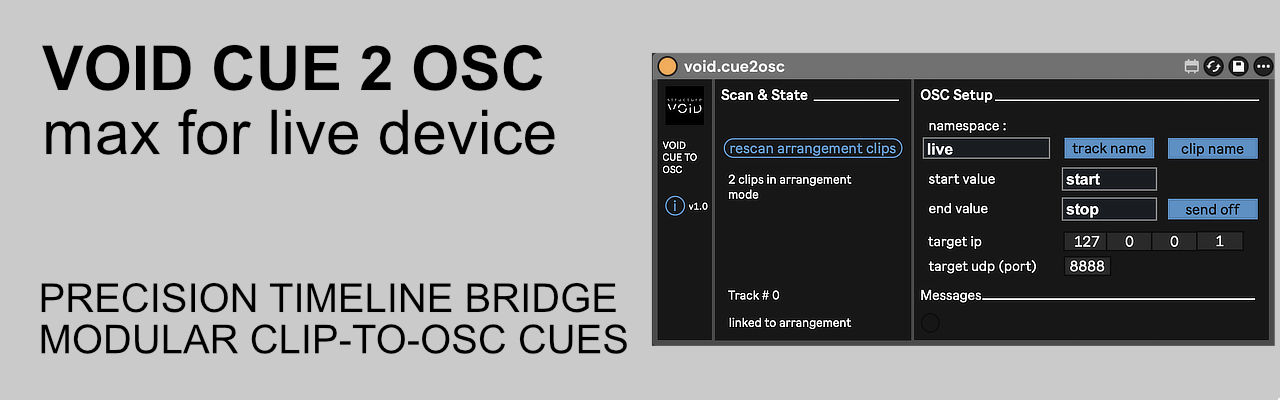
Transform Ableton Live into a multi-timeline control hub for visuals, lighting, and interactive systems. A high-precision bridge to synchronize your Ableton clips as cues with the rest of your setup (TouchDesigner, Resolume, DMX, Unreal Engine…).
1. The Engine: Dual-Mode Triggering
Built for total versatility, the device features a hybrid tracking system that instantly adapts to your workflow.
- Arrangement Mode: Uses a sorted event dictionary to index start/end positions on the timeline. It triggers cues with surgical precision as the playhead crosses boundaries.
- Session Mode: Monitors slot playback states in real-time, firing instant cues upon clip launch or stop.
2. The Architecture: Modular Address Building
Unlike rigid OSC mappers, you define the hierarchy of your data stream. Toggle switches allow you to dynamically include or exclude metadata:
- Namespace: Your global project prefix (supports sub-paths like stage/visuals).
- Track & Clip: Sanitized metadata injection. Spaces are auto-replaced with underscores (
_) and quotes are stripped to ensure 100% OSC compliance.
3. The Payload: Dynamic Value Detection
VOID CUE 2 OSC handles data types intelligently. Define your Start and End values manually in the UI:
- Numeric: If you enter a number (e.g.,
1or127), it is sent as a float/integer. - String: If you enter text (e.g.,
startoractive), it is sent as a string. - Strip Off: A tactical “Send Off” toggle allows you to suppress stop messages entirely for a cleaner, trigger-only stream.
4. The Safety: Performance Guardrails
Designed for professional live environments where stability is non-negotiable.
- Jump Detection: Detects playhead scrubbing or timeline jumps and updates internal states silently to prevent “cue storms.”
- Startup Guard: Robust initialization sequence prevents API errors during heavy project loads.
- Network Ready: Optimized for zero-latency local loopback (
127.0.0.1) or broadcast across complex IP networks.
Tech Specs:
- Format: Max for Live Tool (.amxd)
- OS: Mac & Windows compatible
- Requirements: Ableton Live Suite (or Standard with M4L add-on)
- Network: Compatible with any OSC-enabled software (TouchDesigner, Resolume, Unreal Engine, Processing, etc.)
Installation:
- Download the file : https://structurevoid.gumroad.com/l/void-cue-2-osc
- Drag and drop the
.amxdfile onto any track in Ableton Live (we recommend a dedicated “OSC” track). -
Click the “Save” icon on the device header to store it in your User Library.