
M A X F O R L I V E | V O I D E C O S Y S T E M > CC MONITOR


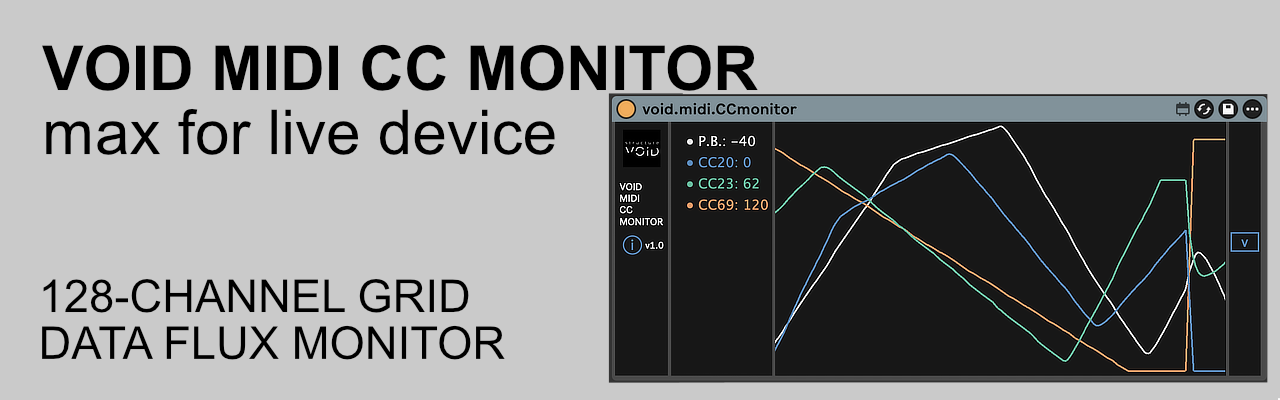
High-density CC MIDI activity monitor. A comprehensive 16×8 matrix and multi-channel flux display designed for real-time oversight of automation data and hardware mapping within Ableton Live.
1. The Core: 16×8 Activity Grid & Multi-Stream Trace
-
16×8 Matrix: Engineered to track all 128 MIDI Control Change channels simultaneously for an immediate visual map of your entire MIDI environment.
-
Dynamic Flux Display: A dedicated visualization zone that traces the temporal evolution of your controllers. Unlike standard monitors, it can plot multiple overlapping CC streams, allowing you to analyze the interaction and timing of complex automation curves in real-time.
2. The Logic: Dual-State Rendering
Move beyond simple data blinks with an integrated decay engine designed to distinguish between movement and status:
-
Activity Flash: Instant illumination upon receiving new MIDI data for real-time performance feedback.
-
Persistence: Maintains a dimmed visual state for the last received value, ensuring static parameters remain visible even after the initial data burst.
3. The Precision: Pitch Bend & Intensity Mapping
-
PB Monitoring: Dedicated handling on the primary slot (Index 0), specifically mapped to visualize Pitch Bend data with a dynamic “PB” label.
-
Bar Height: Each cell features a vertical bar representing the exact depth of the CC value (0-127).
-
Brightness: Global luminosity reflects the real-time activity and data density of each individual channel.
4. The Control: Engine Management
-
Device Enable: A dedicated toggle to suspend the monitoring engine. When disabled, the processing task is cancelled to save CPU and the grid is automatically cleared.
-
Visual Clarity: High-refresh-rate rendering ensures that even high-density automation streams are displayed without lag.
Tech Specs:
-
Format: Max for Live MIDI Effect (.amxd)
-
OS: Mac & Windows compatible (Universal)
-
Requirements: Ableton Live Suite (or Standard with M4L add-on)
Installation:
-
Download the file : https://structurevoid.gumroad.com/l/void-midi-cc-monitor
-
Drag and drop the .amxd file onto any MIDI Track in Ableton Live.
-
Click the “Save” icon on the device header to store it in your User Library.