
M A X F O R L I V E | V O I D E C O S Y S T E M > NOTE MONITOR


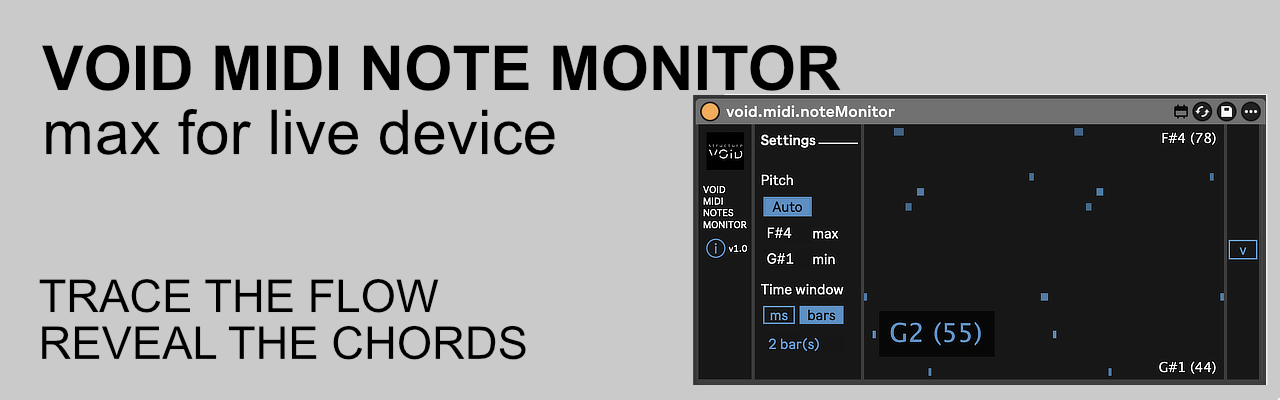
Real-time MIDI notes flow analysis. A high-performance visualization engine designed to reveal harmonic structures and temporal patterns within Ableton Live.
1. The Core: Real-Time Flow Analysis
Driven by a high-refresh-rate rendering engine, this device provides a continuous horizontal trace of your MIDI stream. It transforms abstract data into a clear temporal footprint, making it the ideal tool for dissecting how MIDI effects like Arpeggiator or Note Length alter your sequences.
2. The Logic: Advanced Pitch Scaling
Forget manual range adjustments. The device features an intelligent auto-scaling engine that dynamically recalculates vertical resolution based on active notes. Whether you are playing deep sub-bass or high-pitched glissandos, the monitor optimizes its grid in real-time to ensure maximum visual detail.
3. The HUD: Integrated Chord & Harmonic Recognition
Move beyond simple note monitoring. The built-in Chord HUD analyzes incoming pitch classes (Chroma) to identify and display harmonic structures instantly.
- Chord Recognition: Real-time identification of Major, Minor, 7th, and complex stacks.
- Note HUD: Dynamic labeling of active notes and their MIDI values.
- Visibility: Positioned at the bottom-left to provide critical feedback without obstructing the flow.
4. The Dynamics: Velocity-Sensitive Mapping
The visual density is directly mapped to the MIDI velocity. By using variable opacity, the monitor highlights accent patterns and ghost notes within your flow. This depth allows you to visualize the human feel or the rhythmic velocity-shifting of your generative chains at a glance.
Tech Specs:
- Format: Max for Live MIDI Effect (.amxd)
- OS: Mac & Windows compatible
- Requirements: Ableton Live Suite (or Standard with M4L add-on)
Installation:
- Download the file : https://structurevoid.gumroad.com/l/void-midi-note-monitor
- Drag and drop the .amxd file directly onto a MIDI Track in Ableton Live.
- Click the “Save” icon on the device header to store it in your User Library.