MAX FOR LIVE | VOID ECOSYSTEM > WEBSAMPLER


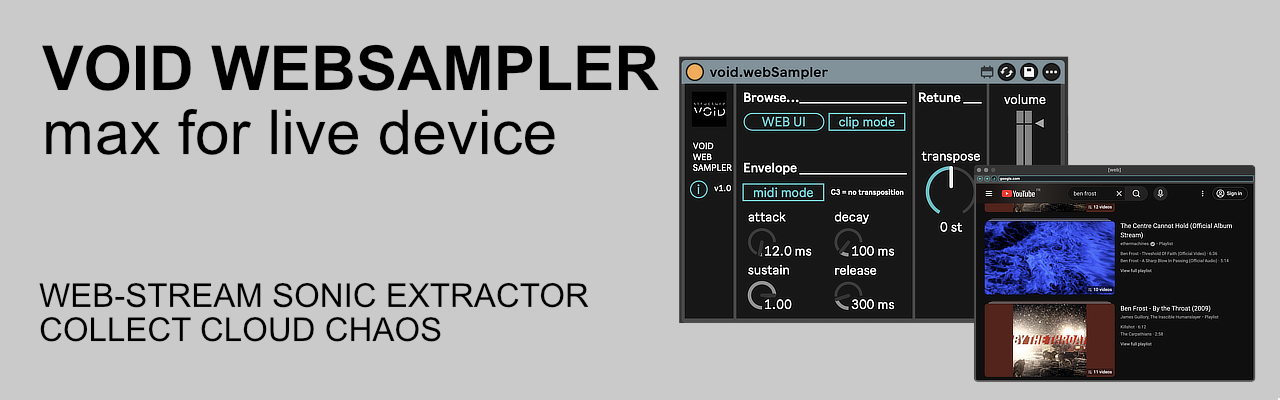
Real-time Web Sampling & Spectral Warping Engine. A high-performance sampling interface designed to bridge the gap between world-wide web content and Ableton Live’s internal DSP.
About this device
void.websampler is a generic audio routing tool. It embeds a standard web browser inside Ableton Live and routes the resulting audio into Live’s signal chain, in the same way as any virtual audio cable or system audio capture utility.
Users are solely responsible for what they load, capture, or record through the device. This includes complying with the terms of service of any website or online platform accessed through the embedded browser, and with the copyright laws applicable in their jurisdiction.
Structure Void provides void.websampler as a neutral technical tool and does not endorse, encourage, or support any use that would violate third-party rights or platform terms of service.
1. The Gateway: Web UI & Navigation
Driven by a dedicated browsing engine, this device transforms any online resource into a manageable audio stream.
- URL HUD: Integrated cleaning engine automatically sanitizes raw text (fixing
https://and trimming artifacts). - Clip Mode (Binding): When active, the device follows your performance. Simply rename any clip on the track with a website address; the sampler will instantly load that site the moment you launch the clip. This allows for seamless, automated sound source changes synchronized with your arrangement.
2. The Warp: Pitch & Ratio Shift
The device utilizes a Phase-Locked Vocoder (pfft~) to decouple pitch from time.
- MIDI Poly-Pitch (MIDI Mode): MIDI notes drive the transposition relative to C3 (Unity).
- Global Retune (Semi-tones): A dedicated bipolar dial ranging from -24 to +24 semi-tones (2 octaves up/down).
- Sweet Spots: Small adjustments (±1 to 7 st) allow for perfect harmonic integration with your track.
- Extreme Ranges: At -24st or +24st, the FFT bin shifting creates “Aliasing Artifacts” and “Spectral Smearing.” This results in metallic, robotic textures or deep, cavernous sub-frequencies that completely deconstruct the original web source.
3. The Shutter: Envelope-Gated Sampling
- MIDI Mode (Active): The sampler acts as a gated instrument. Each note triggers the ADSR envelope while simultaneously shifting the spectral content to the played pitch.
- Bypass Mode (Inactive): Continuous flow. The Retune dial becomes a manual frequency shifter for live performance or drone manipulation.
4. The HUD: Precision ADSR & Gain Stage
The interface utilizes high-performance vector rendering to provide tactile control over the sonic contour.
- Envelope HUD: Four dedicated dials (Attack, Decay, Sustain, Release) allow for precise temporal sculpting of the web stream, from sharp percussive transients to evolving ambient washes.
- Vertical Master Slider: A high-resolution output fader with an integrated peak indicator ensures the sampled signal remains within optimal gain stages before hitting the track mixer.
Tech Specs:
- Format: Max for Live Audio Effect (.amxd)
- OS: Mac & Windows compatible
- Requirements: Ableton Live Suite 12+ (or Standard with M4L add-on).
- Engine: Optimized Chromium-based rendering for ultra-low latency audio monitoring.
Installation:
- Download the file : https://structurevoid.gumroad.com/l/void-websampler
- Drag and drop the
.amxdfile directly onto an Audio or MIDI Track in Ableton Live. -
Click the “Save” icon on the device header to store it in your User Library.